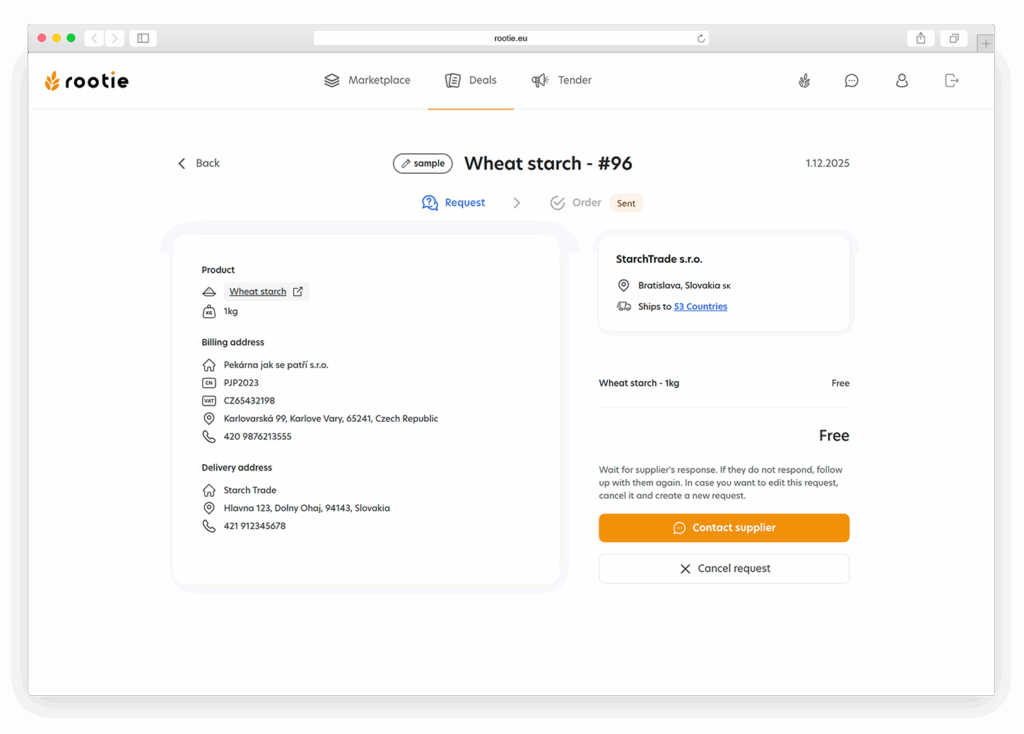




After you have submitted your sample request, you can track and manage the details as follows:
View Request Details: Navigate to the „Deals“ section and click on your sample request to open its details (see Figure 31). Here, you‘ll find comprehensive information including the sample‘s product details, billing and delivery addresses, and any preliminary price set by the seller.
Communication Options: If you need to discuss the sample request further or have specific questions, use the „Contact supplier“ button to initiate direct communication with the seller through the platform’s chat feature.
Cancel the Request: If your needs change or you decide not to proceed with the sample, you can cancel the request at any time by clicking the „Cancel request“ button.
This system not only keeps you informed about the status of your sample request but also provides flexible options to ensure that your specific needs are met efficiently.